Documentation Contributions
We highly appreciate any suggestions for improvements to enhance the clarity of our documentation. Documentation is written using Markdown files that are rendered and transformed into a static website using Jekyll and its template Just the Docs.
Add New Pages
Each respective tab on the website has its corresponding folder (e.g., ~\docs\library\ for the library section). In this folder, there is always an index.md file that corresponds to the main page for this tab. Each subpage can be named arbitrarily (e.g., page.md) and must reference the parent page in the file header using the parent field.
---
title: New Page
layout: default
math: mathjax
parent: Library
nav_order: 10
---
title: Page titlelayout: Keep this atdefaultmath: Optional, addmathjaxto enable MathJax syntax on this pageparent: Reference the parent page by name for subpagesnav_order: Defines the subpage order. 2 appears higher than 3 in navigation
Directly after the header, every page repeats its title, applies the heading styles, and opens a table of contents:
# New Page
{: .fs-8 .fw-500 .no_toc}
---

One or two sentences summarising what this page is about.
{: .fw-500}

- TOC
{:toc}
.fs-8 .fw-500is the large page title style,.no_tockeeps the title itself out of the table of contents- The lead paragraph marked
.fw-500is rendered in a slightly heavier font and acts as the page summary - TOCwith{:toc}generates the table of contents from the##and###headings
Add {: .no_toc} under any heading that should not appear in the table of contents. Repetitive subheadings such as #### Parameters, #### Returns and #### Notes always use it.
Page Templates
Pages in the same section share a layout, so a reader can move between them without re-learning the structure. Before writing a new page, open an existing one in the same section and mirror its headings.
- Library pages document one peripheral each: Errors, Structs, Functions, Examples, Developer Notes. The exact layout is described in Library Contributions. Reference page: ADC
- Project pages describe one project each: Introduction, Background, Code Layout, Configuration, Implementation, Showcase, Developer Notes. The exact layout is described in Project Contributions. Reference page: Audio Recording
Syntax
Math
Add math: mathjax to the page header and wrap formulas in $$:
The transmitted signal sweeps a bandwidth $$B$$ over the chirp period $$T_c$$.

$$t_0 = \frac{2d}{c}$$

* $$c$$ is the speed of sound in air
* $$d$$ is the distance to the object
Images
If you have any images, place them into the ~\docs\assets\images\ folder and reference them with {{site.baseurl}}. Below is an example with centering and width adjustment.
<img src="{{site.baseurl}}/assets/images/my_picture.png" alt="drawing" width="500"/>
{: .text-center}
Links
Link to other wiki pages with the Jekyll link tag:
Follow [Documentation Contributions]({% link contributing/docs.md %}) for details.
See the [pin mapping]({% link library/adc.md %}#adc_mapping) for the available ADCs.
For repeated external links, use reference-style definitions at the bottom of the page:
Rendered with [Jekyll] and its template [Just the Docs].

[Jekyll]: https://jekyllrb.com/
[Just the Docs]: https://just-the-docs.com/
Tables
| Constant | Default | Meaning |
|:---------|:--------|:--------|
| `SAMPLING_RATE` | 44100 | ADC sampling rate in Hz. |
| `CHUNK_SIZE` | 256 | DMA half-buffer size in samples. |
Code Blocks
Always tag the fence with a language (c, matlab, python, json, md). Show short snippets, instead of pasting whole files.
Callouts/Alerts
SensEdu documentation utilizes a custom callout system suggested by Peter Mosses in the just-the-docs PR #1602. These callouts, referred to as Alerts, enhance customization options and allow distinct styling for light and dark themes.
To use an Alert, simply add {: .ALERT_NAME} in the next line directly after the target text. By default, the following alerts are available:
- Warning (
.WARNING): Red - Important (
.IMPORTANT): Orange/Yellow - Tip (
.TIP): Green - Note (
.NOTE): Blue
This way you can define a tip alert!
{: .TIP}
This way you can define a tip alert!
Creating own Alerts
If you need custom alerts, you can define new styles by modifying the Sass files. Go to the folder ~\docs\_sass\color_schemes\. Here you can find files custom.scss and custom_dark.scss, which contain colors for light and dark modes respectively.
In each of this file define a new variable and assign a color with RGBA or HEX coding: $new_alert_color:rgb(202, 52, 190);.
Create a new alert @include alert() with the following arguments:
- Alert Code: CUSTOM_ALERT is accessed by
.CUSTOM_ALERTcode - Title Color: Use previously defined variable
$new_alert_color - Title (optional): Text displayed on top of the alert
- Background Color (optional): A custom background color. By default the Title Color with 10% opacity is used.
Below is a complete example for adding a new Error alert:
// Example with defined bg color for light theme, default 10% opacity for dark theme

// custom.scss
$error_color: rgb(190, 42, 178);
$error_bg_color: rgb(207, 182, 205);

@include alert(ERROR, $error_color, "Error", $error_bg_color);

// custom_dark.scss
$error_color: rgb(146, 94, 142);

@include alert(ERROR, $error_color, "Error");
Unexpected Sampling Frequency
{: .ERROR}
Others
Other syntax is standard for Markdown with modifiers added by Just the Docs. Follow these pages to explore the syntax further:
Wiki Hosting
When you edit the wiki, it is advised to observe your changes on the finished rendered webpage. You can host it locally by following these steps:
- Administrator rights may be required to install Ruby and its gems.
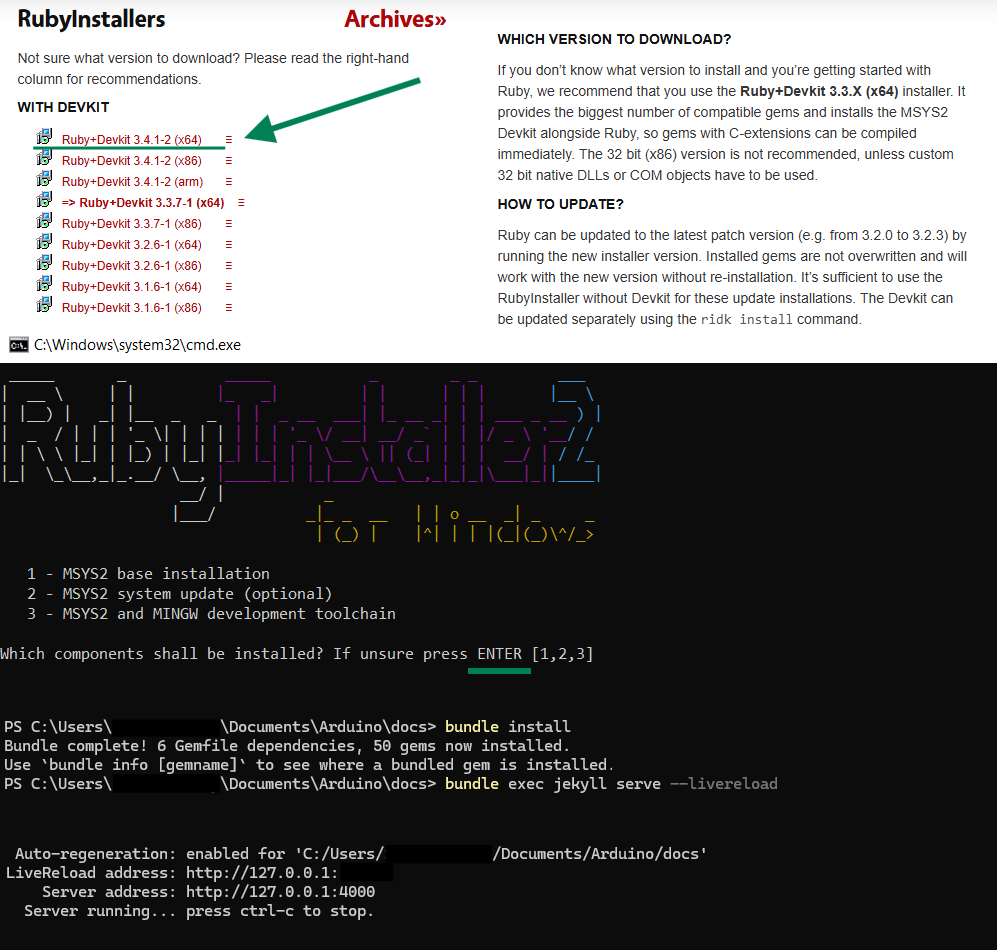
- Visit the Ruby installation page. Download the x64 version with devkit.
During installation you will be asked which components to install, press
Enterfor default. - Open the terminal with admin rights in
/docsfolder. - Install gems with
bundle installcommand. - Boot the website with
bundle exec jekyll serve --livereload. Parameter--livereloadis optional, it enables automatic website reloading if you make any changes to styles/text etc. - Go to the page
localhost:4000in your browser to see the website.
Notes:
- Stop the running website with
Ctrl+Cin the terminal. - If you modify
_config.yml, restart the page (even if--livereloadenabled).