ADC Peripheral
Analog-to-Digital Converters (ADCs) translate analog signals from microphones and other sensors into digital form, readable by CPU.
The STM32H747 features three 16-bit ADCs with up to 20 multiplexed channels each.
- Errors
- Structs
- Functions
- SensEdu_ADC_Init
- SensEdu_ADC_Enable
- SensEdu_ADC_Disable
- SensEdu_ADC_Start
- SensEdu_ADC_IsDmaTransferComplete
- SensEdu_ADC_ClearDmaTransferComplete
- SensEdu_ADC_IsDmaHalfTransferComplete
- SensEdu_ADC_ClearDmaHalfTransferComplete
- SensEdu_ADC_ReadConversion
- SensEdu_ADC_ReadSequence
- SensEdu_ADC_EnableOverrunInterrupt
- SensEdu_ADC_DisableOverrunInterrupt
- SensEdu_ADC_IsOverrun
- SensEdu_ADC_ClearOverrun
- SensEdu_ADC_GetOverrunCount
- Examples
- Developer Notes
Errors
ADC error codes use the 0x20xx range. See how to display errors in your Arduino sketch here.
An overview of possible errors for ADC:
0x2000: No error0x2001: Invalid ADC instance; must beADC1,ADC2, orADC30x2002: ADC initialization failed0x2003: Invalid pin array size; use an integer 1-160x2004: Invalid pin array0x2005: Invalid sampling rate; must be at least 10Hz0x2006: Invalid DMA buffer address or size0x2007: Invalid mode config; you cannot set a sampling rate in one-shot mode0x2008: Invalid ADC channel; the selected ADC instance is not available on this pin, refer to the table for mapping details0x2009: Failed to enable ADC0x200A: Failed to disable ADC0x200B: Software polling used with DMA mode; switch to software mode0x200C: Software polling attempted without enabling the ADC
An overview of critical errors. They shouldn’t happen in normal user case and indicate some problems in library code:
0x20A0: General undefined behaviour detected0x20A1: PLL configuration failed0x20A2: Internal channel selection logic failed0x20A3: Internal sampling time selection logic failed0x20A4: Operation mode selection received an unexpected value0x20A5: Data management mode selection received an unexpected value
Structs
SensEdu_ADC_Settings
ADC configuration structure.
typedef struct {
    ADC_TypeDef* adc;
    uint8_t* pins;
    uint8_t pin_num;

    SENSEDU_ADC_SR_MODE sr_mode;
    uint32_t sampling_rate_hz;

    SENSEDU_ADC_MODE adc_mode;
    uint16_t* mem_address;
    uint16_t mem_size;
} SensEdu_ADC_Settings;
Fields
adc: Selects the ADC peripheral (ADC1,ADC2orADC3)pins: Array of Arduino-labeled analog pins (e.g., {A0,A3,A7}). The ADC will sequentially sample these pinspin_num:pinsarray lengthsr_mode:SENSEDU_ADC_SR_MODE_FREE: ADC runs as fast as possibleSENSEDU_ADC_SR_MODE_FIXED: ADC runs at fixed timer-triggered rate
sampling_rate_hz: Specified sampling frequency forSENSEDU_ADC_SR_MODE_FIXEDmode in Hzadc_mode:SENSEDU_ADC_MODE_POLLING_ONE_SHOT: ADC performs exactly one sequence and stopsSENSEDU_ADC_MODE_POLLING_CONT: ADC runs indefinitely until stoppedSENSEDU_ADC_MODE_DMA_NORMAL: DMA fills the buffer and stopsSENSEDU_ADC_MODE_DMA_CIRCULAR: DMA fills the buffer “in a ring”, wrapping indefinitely
mem_address: DMA buffer addressmem_size: DMA buffer size
Notes
Be aware of which pins you can use with the selected ADC. Table below shows ADC connections. For example, you can’t access ADC3 with pin A7, because it is only connected to ADC1.
ADCx_INPy:x: Connected ADCs (e.g.,ADC12_INP4-ADC1andADC2)y: Channel index
| Arduino Pin | STM32 GPIO | Available ADCs |
|---|---|---|
| A0 | PC4 | ADC12_INP4 |
| A1 | PC5 | ADC12_INP8 |
| A2 | PB0 | ADC12_INP9 |
| A3 | PB1 | ADC12_INP5 |
| A4 | PC3 | ADC12_INP13 |
| A5 | PC2 | ADC123_INP12 |
| A6 | PC0 | ADC123_INP10 |
| A7 | PA0 | ADC1_INP16 |
| A8 | PC2_C | ADC3_INP0 |
| A9 | PC3_C | ADC3_INP1 |
| A10 | PA1_C | ADC12_INP1 |
| A11 | PA0_C | ADC12_INP0 |
Functions
SensEdu_ADC_Init
Configures ADC clock and initializes peripheral with specified settings (channels, sampling frequency, etc.).
void SensEdu_ADC_Init(SensEdu_ADC_Settings* adc_settings);
Parameters
adc_settings: Pointer to the ADC configuration structure
Notes
- Some ADC configuration registers are shared between multiple ADC instances. These registers can only be modified while all related ADCs are disabled.
- Initializes the associated DMA when using
SENSEDU_ADC_MODE_DMA_xxxmodes. - Initializes the associated sampling timer when using
SENSEDU_ADC_SR_MODE_FIXEDmode.
All required ADCs must be initialized before enabling any of them. Enabling an ADC locks certain shared configuration fields.
// ERROR
SensEdu_ADC_Init(ADC1_Settings);
SensEdu_ADC_Enable(ADC1);
SensEdu_ADC_Init(ADC2_Settings);
SensEdu_ADC_Enable(ADC2);

// CORRECT
SensEdu_ADC_Init(ADC1_Settings);
SensEdu_ADC_Init(ADC2_Settings);
SensEdu_ADC_Enable(ADC1);
SensEdu_ADC_Enable(ADC2);
SensEdu_ADC_Enable
Powers on the ADC peripheral.
void SensEdu_ADC_Enable(ADC_TypeDef* adc);
Parameters
adc: ADC Instance (ADC1,ADC2orADC3)
Notes
- Enables the sampling timer when using
SENSEDU_ADC_SR_MODE_FIXEDmode. - Do not confuse with
SensEdu_ADC_Start.Enableturns ADC on, butStarttriggers conversions.
SensEdu_ADC_Disable
Deactivates the ADC peripheral.
void SensEdu_ADC_Disable(ADC_TypeDef* adc);
Parameters
adc: ADC Instance (ADC1,ADC2orADC3)
Notes
- Disables the associated DMA when using
SENSEDU_ADC_MODE_DMA_xxxmodes.
SensEdu_ADC_Start
Triggers ADC conversions.
void SensEdu_ADC_Start(ADC_TypeDef* adc);
Parameters
adc: ADC Instance (ADC1,ADC2orADC3)
Notes
- Enables the associated DMA in
SENSEDU_ADC_MODE_DMA_xxxmodes. - After this function call, depending on the selected ADC mode, either the DMA buffer will be filled with ADC conversions or you must poll for results manually using
SensEdu_ReadConversion.
SensEdu_ADC_IsDmaTransferComplete
Returns the current DMA transfer completion status.
bool SensEdu_ADC_IsDmaTransferComplete(ADC_TypeDef* adc);
Parameters
adc: ADC Instance (ADC1,ADC2orADC3)
Returns
true: DMA transfer has been completed.false: DMA transfer is still in progress.
Notes
- The DMA completion flag is automatically cleared when calling
SensEdu_ADC_Start(). - The flag is not cleared automatically on read, you need to do it manually:
if (SensEdu_ADC_IsDmaTransferComplete(ADC1)) {
    ...
    // some logic, e.g., USB data transfer
    ...
    SensEdu_ADC_ClearDmaTransferComplete(ADC1);
}
Always check this flag before processing DMA buffers to ensure data integrity.
SensEdu_ADC_ClearDmaTransferComplete
Clears the DMA transfer completion flag.
void SensEdu_ADC_ClearDmaTransferComplete(ADC_TypeDef* adc);
Parameters
adc: ADC Instance (ADC1,ADC2orADC3)
Notes
- The DMA completion flag is automatically cleared when calling
SensEdu_ADC_Start(). - The flag is not cleared automatically on read, you need to do it manually:
if (SensEdu_ADC_IsDmaTransferComplete(ADC1)) {
    ...
    // some logic, e.g., USB data transfer
    ...
    SensEdu_ADC_ClearDmaTransferComplete(ADC1);
}
SensEdu_ADC_IsDmaHalfTransferComplete
Returns the DMA half-transfer completion status.
bool SensEdu_ADC_IsDmaHalfTransferComplete(ADC_TypeDef* adc);
Parameters
adc: ADC Instance (ADC1,ADC2orADC3)
Returns
true: Half of the DMA buffer has been filled.false: Half-transfer has not been reached yet.
Notes
- Useful for double-buffering and low-latency signal processing.
- The flag is not cleared automatically on read, you need to do it manually:
if (SensEdu_ADC_IsDmaHalfTransferComplete(ADC1)) {
    ...
    // some logic, e.g., USB data transfer
    ...
    SensEdu_ADC_ClearDmaHalfTransferComplete(ADC1);
}
SensEdu_ADC_ClearDmaHalfTransferComplete
Clears the DMA half-transfer completion flag.
void SensEdu_ADC_ClearDmaHalfTransferComplete(ADC_TypeDef* adc);
Parameters
adc: ADC Instance (ADC1,ADC2orADC3)
Notes
- Should be called after processing the first half of the DMA buffer.
- The flag is not cleared automatically on read, you need to do it manually:
if (SensEdu_ADC_IsDmaHalfTransferComplete(ADC1)) {
    ...
    // some logic, e.g., USB data transfer
    ...
    SensEdu_ADC_ClearDmaHalfTransferComplete(ADC1);
}
SensEdu_ADC_ReadConversion
Reads a single ADC conversion using CPU polling (non-DMA).
uint16_t SensEdu_ADC_ReadConversion(ADC_TypeDef* adc)
Parameters
adc: ADC Instance (ADC1,ADC2orADC3)
Returns
- 16-bit ADC conversion result from the selected channel.
Notes
- Intended for single-channel measurements. For multi-channel readings, use
SensEdu_ADC_ReadSequence(). - Consumes CPU cycles; DMA is always the better option and frees the CPU for other tasks. With DMA you can achieve much higher data rates and parallelize computations while the buffer is being filled with new data.
- Refer to non-DMA examples like
ADC_1CH_Poll_xxx.
SensEdu_ADC_ReadSequence
Reads a sequence of ADC conversions using CPU polling (non-DMA).
uint16_t* SensEdu_ADC_ReadSequence(ADC_TypeDef* adc)
Parameters
adc: ADC Instance (ADC1,ADC2orADC3)
Returns
- Pointer to an array containing ADC conversion results. Array indices correspond to the channel order defined in
SensEdu_ADC_Settings.
Notes
- Intended for multi-channel measurements. For single-channel readings, use
SensEdu_ADC_ReadConversion(). - In
SENSEDU_ADC_MODE_POLLING_CONTmode multi-channel software polling is problematic. Due to race conditions between EOC/EOS flags, and the automatic start of the next conversion, reliable multi-channel polling is not guaranteed, occasional desynchronization may occur, breaking channel alignment. Higher sampling rate increases the risk of misalignment even further. - Consumes CPU cycles; DMA is always the better option and frees the CPU for other tasks. With DMA you can achieve much higher data rates and parallelize computations while the buffer is being filled with new data.
- Refer to non-DMA examples like
ADC_3CH_Poll_xxx.
Multi-channel CPU polling is inefficient and not recommended at all. It scales very poorly with channel count and sampling frequency. These polling examples are included mainly for educational purposes, as they are more intuitive. Use DMA whenever possible.
SensEdu_ADC_EnableOverrunInterrupt
Enables the ADC overrun interrupt.
void SensEdu_ADC_EnableOverrunInterrupt(ADC_TypeDef* adc);
Parameters
adc: ADC Instance (ADC1,ADC2orADC3)
Notes
- Generates an interrupt when a new conversion result overwrites unread data.
- Useful for detecting sampling or processing bottlenecks.
- You can see the problem with continuous software polling very clear using overrun interrupts. Navigate to
ADC_1CH_Poll_Continuousexample, play with the sampling rate setting, and observe the amount of missed samples in the Serial Monitor.
SensEdu_ADC_DisableOverrunInterrupt
Disables the ADC overrun interrupt.
void SensEdu_ADC_DisableOverrunInterrupt(ADC_TypeDef* adc);
Parameters
adc: ADC Instance (ADC1,ADC2orADC3)
SensEdu_ADC_IsOverrun
Checks whether an ADC overrun event has occurred.
bool SensEdu_ADC_IsOverrun(ADC_TypeDef* adc);
Parameters
adc: ADC Instance (ADC1,ADC2orADC3)
Returns
true: An overrun event has occurred.false: No overrun detected.
Notes
- The flag is not cleared automatically on read, you need to do it manually.
SensEdu_ADC_ClearOverrun
Clears the ADC overrun flag.
void SensEdu_ADC_ClearOverrun(ADC_TypeDef* adc);
Parameters
adc: ADC Instance (ADC1,ADC2orADC3)
Notes
- Should be called after handling an overrun condition.
SensEdu_ADC_GetOverrunCount
Returns the total number of ADC overrun events.
uint32_t SensEdu_ADC_GetOverrunCount(ADC_TypeDef* adc);
Parameters
adc: ADC Instance (ADC1,ADC2orADC3)
Returns
- Total number of detected overrun events since initialization.
Examples
Examples are organized incrementally. Each builds on the previous one by introducing only new features or modifications. Refer to earlier examples for core functionality details.
If you want to see complete examples, visit \examples\ directory or open them via Arduino IDE by navigating to File → Examples → SensEdu.
ADC_1CH_Poll_One_Shot
Requests and reads one ADC conversion directly via CPU for one selected analog pin.
- Include the SensEdu library
- Declare the ADC instance, pin array, and array size corresponding to your channel count for the selected ADC
- Configure ADC Parameters by declaring
SensEdu_ADC_Settingsstruct - Disable the sampling timer by setting the SR mode to
SENSEDU_ADC_SR_MODE_FREE - Enable one-shot software polling by setting the ADC mode to
SENSEDU_ADC_MODE_POLLING_ONE_SHOT - Initialize with
SensEdu_ADC_Init()and power up the ADC usingSensEdu_ADC_Enable() - Start the ADC with
SensEdu_ADC_Start() - Read conversion result with
SensEdu_ADC_ReadConversion() - Print results using
Serialand view it in the Serial Monitor - Test by connecting the selected pin to GND or 3.3 V; the values should range from 0 to 65535
#include "SensEdu.h"

ADC_TypeDef* adc = ADC1;
const uint8_t adc_pin_num = 1;
uint8_t adc_pins[adc_pin_num] = {A0};
SensEdu_ADC_Settings adc_settings = {
    .adc = adc,
    .pins = adc_pins,
    .pin_num = adc_pin_num,

    .sr_mode = SENSEDU_ADC_SR_MODE_FREE,
    .sampling_rate_hz = 0,

    .adc_mode = SENSEDU_ADC_MODE_POLLING_ONE_SHOT,
    .mem_address = 0x0000,
    .mem_size = 0
};

void setup() {
    Serial.begin(115200);
    SensEdu_ADC_Init(&adc_settings);
    SensEdu_ADC_Enable(adc);
}

void loop() {
    SensEdu_ADC_Start(adc);
    uint16_t data = SensEdu_ADC_ReadConversion(adc);
    Serial.println(data);
}
Notes
- In some modes there are unused parameters. For instance, in software polling without a sampling timer, you don’t use
.sampling_rate_hzor.mem_address. Such parameters can be set to any value; they are ignored. - ADC values are 16-bit, vary from 0 (0V) to 65535 (3.3V).
ADC_3CH_Poll_One_Shot
Requests and reads one ADC conversion directly via CPU for multiple selected analog pins.
- Follow the base configuration from the
ADC_1CH_Poll_One_Shotexample - Extend the pin array to include more channels. Update array size to match the channel count.
- Replace
SensEdu_ADC_ReadConversion()withSensEdu_ADC_ReadSequence()to retrieve the sequence of conversions - Update the print function to include all channels
...
const uint8_t adc_pin_num = 3;
uint8_t adc_pins[adc_pin_num] = {A0, A1, A2};
...
void loop() {
    SensEdu_ADC_Start(adc);
    uint16_t* data = SensEdu_ADC_ReadSequence(adc);

    Serial.println("-------");
    for (uint8_t i = 0; i < adc_pin_num; i++) {
        Serial.print("CH");
        Serial.print(i);
        Serial.print(" = ");
        Serial.println(data[i]);
    }
}
Notes
- Compared to the single-channel configuration,
SensEdu_ADC_ReadSequence()returns a pointer rather than a value. Using this pointer, you can access all channels in a sequence with index brackets[]. - ADC conversions are organized in a “package” called a sequence. They follow exact order defined in
adc_pins(A0 → A1 → A2 in this example).
ADC_1CH_Poll_Continuous
Continuously reads ADC conversions directly via CPU for one selected analog pin.
- Follow base configuration from the
ADC_1CH_Poll_One_Shotexample - Change the ADC mode to
SENSEDU_ADC_MODE_POLLING_CONT - Move the
SensEdu_ADC_Start()function intosetup(), as the ADC needs to be started only once
#include "SensEdu.h"

ADC_TypeDef* adc = ADC1;
const uint8_t adc_pin_num = 1;
uint8_t adc_pins[adc_pin_num] = {A0};
SensEdu_ADC_Settings adc_settings = {
    .adc = adc,
    .pins = adc_pins,
    .pin_num = adc_pin_num,

    .sr_mode = SENSEDU_ADC_SR_MODE_FREE,
    .sampling_rate_hz = 0,

    .adc_mode = SENSEDU_ADC_MODE_POLLING_CONT,
    .mem_address = 0x0000,
    .mem_size = 0
};

void setup() {
    Serial.begin(115200);
    SensEdu_ADC_Init(&adc_settings);
    SensEdu_ADC_Enable(adc);
    SensEdu_ADC_Start(adc);
}

void loop() {
    uint16_t data = SensEdu_ADC_ReadConversion(adc);
    Serial.println(data);
}
Notes
- This example is intended only for educational purposes. For continuous data transfers, use DMA (see
ADC_1CH_DMA_Normal). - You can enable the sampling timer by setting the SR mode to
SENSEDU_ADC_SR_MODE_FIXED. Expect marginally acceptable sampling rate of up to about 1000Hz in single-channel software polling mode. - You can optionally enable overrun interrupts with
SensEdu_ADC_EnableOverrunInterrupt()to observe missing samples by slightly increasing the sampling frequency. See the example source code for a complete demonstration.
ADC_3CH_Poll_Continuous
Continuously reads sequences of ADC conversions directly via CPU for multiple selected analog pins.
- Follow base configuration from the
ADC_1CH_Poll_Continuousexample - Extend the pin array to include more channels. Update array size to match the channel count
- Replace
SensEdu_ADC_ReadConversion()withSensEdu_ADC_ReadSequence()to retrieve the sequence of conversions - Update the print function to include all channels
...
const uint8_t adc_pin_num = 3;
uint8_t adc_pins[adc_pin_num] = {A0, A1, A2};
...
void loop() {
    uint16_t* data = SensEdu_ADC_ReadSequence(adc);

    Serial.println("-------");
    for (uint8_t i = 0; i < adc_pin_num; i++) {
        Serial.print("CH");
        Serial.print(i);
        Serial.print(" = ");
        Serial.println(data[i]);
    }
}
Notes
- This example is intended only for educational purposes. For continuous data transfers, use DMA (see
ADC_3CH_DMA_Normal). - Due to race conditions between EOC/EOS flags, and the automatic start of the next conversion, reliable multi-channel polling is not guaranteed, occasional desynchronization may occur, breaking channel alignment. Higher sampling rate increases the risk of misalignment even further.
- Compared to the single-channel configuration,
SensEdu_ADC_ReadSequence()returns a pointer rather than a value. Using this pointer, you can access all channels in a sequence with index brackets[]. - ADC conversions are organized in a “package” called a sequence. They follow exact order defined in
adc_pins(A0 → A1 → A2 in this example).
ADC_1CH_DMA_Normal
Continuously reads ADC conversions using DMA for one selected analog pin.
- Include the SensEdu library
- Declare DMA buffer using
SENSEDU_ADC_BUFFERmacro. It takes two parameters: a user-defined name to reference in code and the buffer size (number of elements) - Declare the ADC instance, pin array, and array size corresponding to your channel count for the selected ADC
- Configure ADC Parameters by declaring
SensEdu_ADC_Settingsstruct - Enable the sampling timer by setting the SR mode to
SENSEDU_ADC_SR_MODE_FIXED - Enable DMA by setting the ADC mode to
SENSEDU_ADC_MODE_DMA_NORMAL - Initialize with
SensEdu_ADC_Init()and power up the ADC usingSensEdu_ADC_Enable() - Start the ADC with
SensEdu_ADC_Start() - Wait for the DMA completion flag by checking
SensEdu_ADC_IsDmaTransferComplete(). Whentrue, read the buffer and perform computation or other operations. - Clear the flag by calling
SensEdu_ADC_ClearDmaTransferComplete() - Optionally restart the ADC for the next data batch with
SensEdu_ADC_Start()
#include "SensEdu.h"

const uint16_t buf_size = 30;
SENSEDU_ADC_BUFFER(buf, buf_size);

ADC_TypeDef* adc = ADC1;
const uint8_t adc_pin_num = 1;
uint8_t adc_pins[adc_pin_num] = {A0};
SensEdu_ADC_Settings adc_settings = {
    .adc = adc,
    .pins = adc_pins,
    .pin_num = adc_pin_num,

    .sr_mode = SENSEDU_ADC_SR_MODE_FIXED,
    .sampling_rate_hz = 10000,

    .adc_mode = SENSEDU_ADC_MODE_DMA_NORMAL,
    .mem_address = (uint16_t*)buf,
    .mem_size = buf_size
};

void setup() {
    Serial.begin(115200);
    SensEdu_ADC_Init(&adc_settings);
    SensEdu_ADC_Enable(adc);
    SensEdu_ADC_Start(adc);
}

void loop() {
    ...
    // Do some CPU processing
    ...
    // DMA runs in the background
    if (SensEdu_ADC_IsDmaTransferComplete(adc)) {
        Serial.println("------");
        for (size_t i = 0; i < buf_size; i++) {
            Serial.print("ADC value ");
            Serial.print(i);
            Serial.print(": ");
            Serial.println(buf[i]);
        };

        // Request next batch
        SensEdu_ADC_ClearDmaTransferComplete(adc);
        SensEdu_ADC_Start(adc);
    }
}
Notes
- Normal DMA mode fills the entire buffer once and then stops, so you need to restart the ADC. If you want continuous buffer refills without restarts, use circular mode.
SensEdu_ADC_Start()resets the DMA completion flag automatically; clearing the flag manually is optional if you callStartimmediately after handling the buffer.- Optimize your code to take advantage of DMA performing memory transfers in the background. For example, start a new measurement mid-calculation when the previous dataset is no longer needed.
Always use the SENSEDU_ADC_BUFFER macro to define arrays for ADC in DMA mode. This macro automatically handles all buffer requirements for cache coherence, regardless of the selected size. For details, see the Cache Coherence section.
ADC_3CH_DMA_Normal
Continuously reads ADC conversions using DMA for multiple selected analog pins.
- Follow the base DMA configuration from the
ADC_1CH_DMA_Normalexample - Extend the pin array to include more channels. Update array size to match the channel count
- Increase the DMA buffer size accordingly
- Update the print function to include all channels
...
const uint8_t adc_pin_num = 3;
uint8_t adc_pins[adc_pin_num] = {A0, A1, A2};

const uint16_t buf_size = 30 * 3;
SENSEDU_ADC_BUFFER(buf, buf_size);
...
void loop() {
    ...
    // Do some CPU processing
    ...
    // DMA runs in the background
    if (SensEdu_ADC_IsDmaTransferComplete(adc)) {
        Serial.println("------");
        for (size_t i = 0; i < buf_size; i+=3) {
            Serial.print("Index ");
            Serial.print(i/3);
            Serial.print(": CH0 = ");
            Serial.print(buf[i]);
            Serial.print(" | CH1 = ");
            Serial.print(buf[i+1]);
            Serial.print(" | CH2 = ");
            Serial.println(buf[i+2]);
        };

        // Request next batch
        SensEdu_ADC_ClearDmaTransferComplete(adc);
        SensEdu_ADC_Start(adc);
    }
}
Notes
- Data is organized into sequences. Conversions follow exactly the same order defined in
adc_pins(A0 → A1 → A2 in this example). - Choose a buffer size that is a multiple of the channel count to store whole sequences without misalignment.
ADC_3CH_DMA_Flags
Demonstrates the use of the DMA half-transfer flag.
- Follow the base DMA configuration from the
ADC_3CH_DMA_Normalexample - Create a secondary buffer to save the DMA buffer at the half-transfer event for comparison
- Initialize both buffers to a non-zero value using
memset() - On the half-transfer event, copy the current buffer state into the secondary buffer
- On DMA completion, compare both buffers.
SENSEDU_ADC_BUFFER(buf_ct, buf_size);   // buffer for complete transfer
SENSEDU_ADC_BUFFER(buf_ht, buf_size);   // buffer for half transfer
...
void setup() {
    Serial.begin(115200);
    SensEdu_ADC_Init(&adc_settings);
    SensEdu_ADC_Enable(adc);

    memset(buf_ct, 0x01, sizeof(buf_ct));
    memset(buf_ht, 0x01, sizeof(buf_ht));

    SensEdu_ADC_Start(adc);
}

void loop() {
    // Half Transfer
    if (SensEdu_ADC_IsDmaHalfTransferComplete(adc)) {
        for (size_t i = 0; i < buf_size; i++) {
            buf_ht[i] = buf_ct[i];
        }
        SensEdu_ADC_ClearDmaHalfTransferComplete(adc);
    }

    // Complete Transfer
    if (SensEdu_ADC_IsDmaTransferComplete(adc)) {
        ...
        // print `buf_ht` contents
        // print `buf_ct` contents
        ...
        SensEdu_ADC_ClearDmaTransferComplete(adc);
    }
}
Notes
- Click the Reset button on the Arduino GIGA R1 to run the example again.
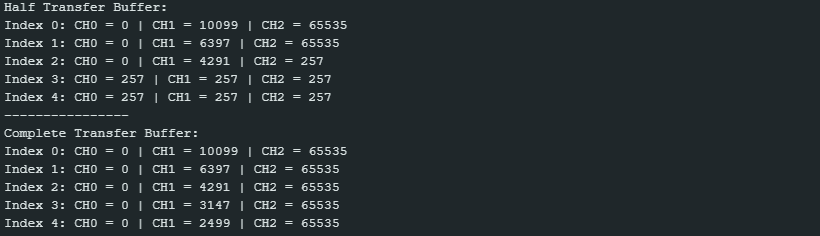
memset()sets bytes; using0x01initializes each 16-bit element to0x0101(257 in decimal).- Use the half-transfer flag to perform computations while the second half of the buffer is being filled.
- For multi-channel ADC, choose a buffer size that is a multiple of
2 × channel_countso the half-transfer boundary aligns with sequence boundaries. Below is an example of when this condition isn’t met. - Example output (buf_size = 15; A0 = GND; A1 = floating; A2 = VDD):
ADC_1CH_DMA_Circular
COMING SOON IN SENSEDU 0.8 (END OF JANUARY 2026)
ADC_3CH_DMA_Circular
COMING SOON IN SENSEDU 0.8 (END OF JANUARY 2026)
ADCx3_Different_SR
Demonstrates the use of different sampling rates for each of the three available ADCs.
- Follow the base DMA configuration from the
ADC_1CH_DMA_Normalexample - Define a separate sampling rate for each ADC
- Replicate the ADC1 configuration for ADC2, and ADC3, differing only in the sampling rate
- Instead of printing, use a serial transmission to send the buffers to MATLAB
- Implement a receiver script in MATLAB to display the three transmitted buffers
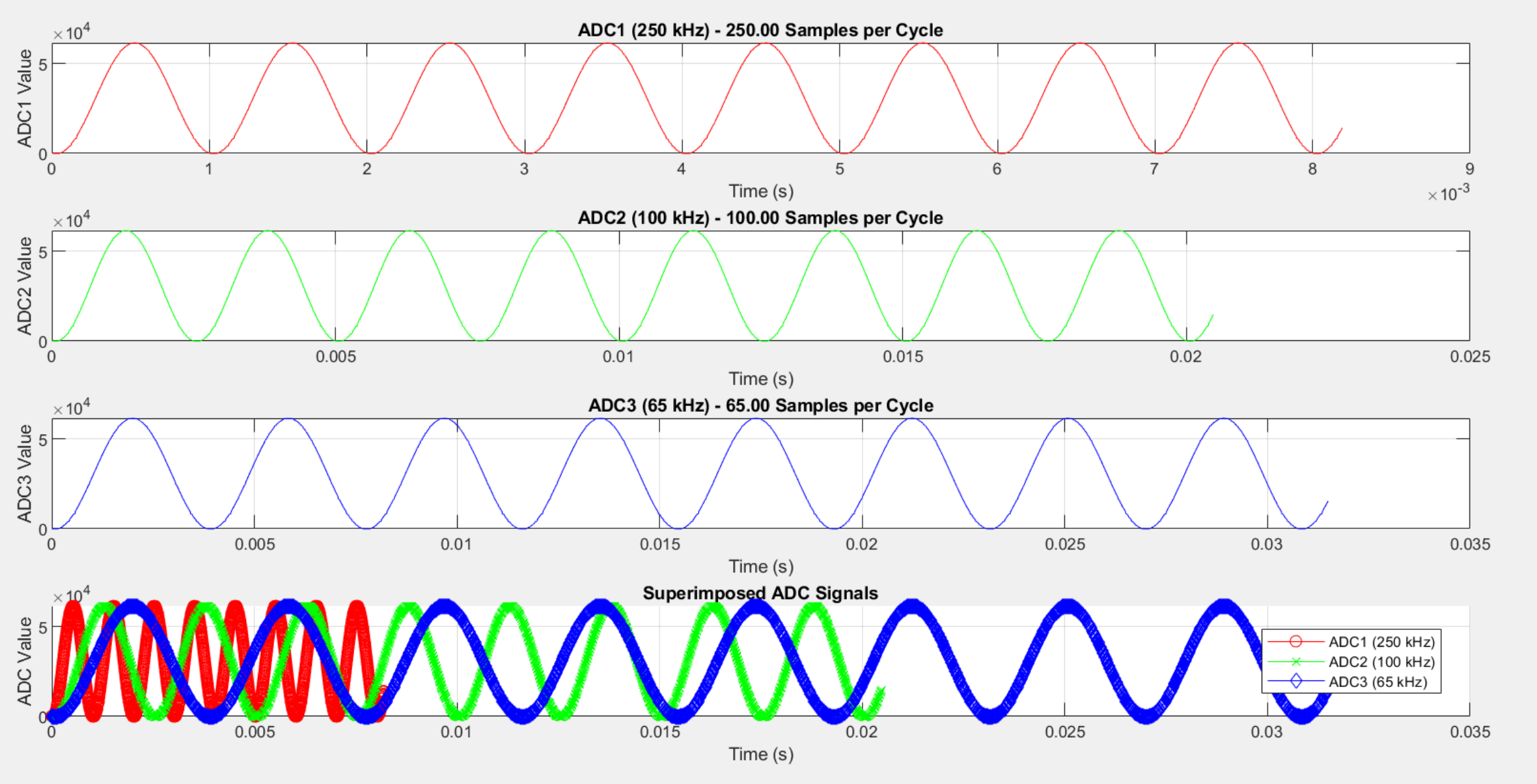
- Connect a 1kHz sine from a wave generator to all three ADCs
- Plot the resulting waveforms in MATLAB; the different sampling rates should produce different numbers of samples per cycle of the sine wave
#define ADC1_SR  250000
#define ADC2_SR  100000
#define ADC3_SR  65000
...
void loop() {
    // Wait for the trigger from MATLAB
    char c;
    while (true) {
        if (Serial.available() > 0) {
            c = Serial.read();
            if (c == 't') {
                break;
            }
        }
        delay(1);
    }

    SensEdu_ADC_Start(adc1);
    SensEdu_ADC_Start(adc2);
    SensEdu_ADC_Start(adc3);

    while (!SensEdu_ADC_IsDmaTransferComplete(adc1));
    SensEdu_ADC_ClearDmaTransferComplete(adc1);
    while (!SensEdu_ADC_IsDmaTransferComplete(adc2));
    SensEdu_ADC_ClearDmaTransferComplete(adc2);
    while (!SensEdu_ADC_IsDmaTransferComplete(adc3));
    SensEdu_ADC_ClearDmaTransferComplete(adc3);

    serial_send_array(buf1, buf_size, 32);
    serial_send_array(buf2, buf_size, 32);
    serial_send_array(buf3, buf_size, 32);
}
...
From the MATLAB side, start the serial connection and trigger the measurement by sending the t character. Inside the loop, the plotting function evaluates how many samples each ADC captures per sine period, based on its sampling rate. This clearly visualizes how the assigned sampling timers affect the effective sampling frequency of each ADC.
...
arduino = serialport(ARDUINO_PORT, ARDUINO_BAUDRATE);
...
for it = 1:ITERATIONS
    write(arduino, 't', "char");

    data_adc1 = read_data(arduino, DATA_LENGTH, "ADC1");
    data_adc2 = read_data(arduino, DATA_LENGTH, "ADC2");
    data_adc3 = read_data(arduino, DATA_LENGTH, "ADC3");

    plot_adc_with_samples_per_cycle(data_adc1, data_adc2, data_adc3, ...
        ADC1_SAMPLING_RATE, ADC2_SAMPLING_RATE, ADC3_SAMPLING_RATE, ...
        SINE_WAVE_FREQ);
end
...
Notes
- Different sampling rates for each ADC are achieved by assigning a different timer to each ADC (see timer occupation).
Developer Notes
DMA Streams
Each ADC occupies one DMA stream:
- ADC1: DMA1_Stream6
- ADC2: DMA1_Stream5
- ADC3: DMA1_Stream7
Avoid reusing occupied DMA streams. Refer to STM32H747 Reference Manual to find free available streams.
Reading ADC Data
The STM32H7 microcontroller is equipped with three ADC modules, each capable of accessing multiple channels (refer to the ADC mapping table above). Reading the ADC values from a single channel is straightforward, as the data is stored consecutively in an array.
However, when reading data from multiple channels within a single ADC module, users must use different approach. The data for each channel is interleaved in the array, meaning that the data for each channel is stored one after the other, rather than all data from first channel followed by all data from second channel, and so forth. This structure is illustrated clearly in the following figure giving an example of using two channels with one ADC module.

Conversion Time
You can calculate the needed time for each conversion \((T_{CONV})\) with this formula:
\[T_{CONV} = T_{SMPL} + T_{SAR}\]- \(T_{SMPL}\): Configured sampling time
- \(T_{SAR}\): Successive approximation time depending on data resolution
In SensEdu, \(T_{SMPL}\) is configured to \(2.5\) ADC clock cycles, which correpsonds to bits SMP[2:0] = 0b001 in the ADC_SMPR1 and ADC_SMPR2 registers.
ADC conversions are fixed to 16-bit resolution, so \(T_{SAR}\) is constant and equals to \(8.5\) ADC clock cycles.
The ADC clock is routed from the PLL2 clock and set to \(25\text{MHz}\) for each individual ADC, which gives us:
\[T_{CONV} = (2.5 \text{ cycles} + 8.5 \text{ cycles}) * \frac{1}{f_{\text{adc_ker_ck}}} = 11 \text{ cycles} * \frac{1}{25\text{MHz}} = 440\text{ns}\]SensEdu is configured to x2 oversampling (basically, averaging), so we require around \(880\text{ns}\) per one ADC conversion, which theoretically gives us a maximum \(1136\text{kS/sec}\) sampling rate. Based on the practical tests of the ADC sampling rate, the theoretical maximum of the sampling rate can be achieved with a negligible error that is the result of various additional delays. Therefore, the practical limit of the ADC sampling rate is set to \(1000\text{kS/sec}\) which corresponds to a sampling frequency of \(1\text{MHz}\). Any attempt to increase this rate further results in a decrease in the actual sampling rate of the module.
Initialization
General ADC configuration:
| Register name | Register Field | Value | Manual Page | Function |
|---|---|---|---|---|
| CR | BOOST | 0b10 | 26.4.3 Page: 958 | ADC clock range \(12.5\text{MHz}:25\text{MHz}\) |
| CFGR | RES | 0b000 | 26.6.4 Page: 1047 | 16-bit Resolution |
| CFGR | OVRMOD | 0b1 | 26.4.27 Page: 998 | Overrun mode (overwrite data) |
| SMPRx | SMPy | 0b001 | 26.4.13 Page: 972 | Sample Time of 2.5 ADC clock cycles |
| CFGR2 | OVSR | 2U - 1U | 26.4.31 Page: 1009 | x2 Oversampling |
| CFGR2 | ROVSE | 0b1 | 26.4.31 Page: 1009 | Enable Oversampling |
| CFGR2 | OVSS | 0b0001 | 26.4.31 Page: 1009 | 1-bit right shift to account for x2 oversampling (averaging) |
DMA vs CPU polling specific:
| CFGR | DMNGT | 0b01 | 26.4.27 Page: 1000 | DMA is enabled in circular mode |
| CFGR | DMNGT | 0b00 | 26.4.27 Page: 1000 | Data is stored only in Data Register (DR) |
Timer triggered mode (sampling rate generation) specific:
| CFGR | EXTEN | 0b01 | 26.4.19 Page: 977 | Enable trigger on rising edge |
| CFGR | EXTSEL | depends on TIMx | 26.4.19 Page: 977 | Code for selected timer that triggers ADC conversions |
Continuous mode specific:
| CFGR | CONT | 0b0 | 26.4.14 Page: 973 | Single conversion mode (SENSEDU_ADC_MODE_ONE_SHOT)
|
| CFGR | CONT | 0b1 | 26.4.15 Page: 973 | Continuous conversion mode (SENSEDU_ADC_MODE_CONT)
|
Clock Configuration
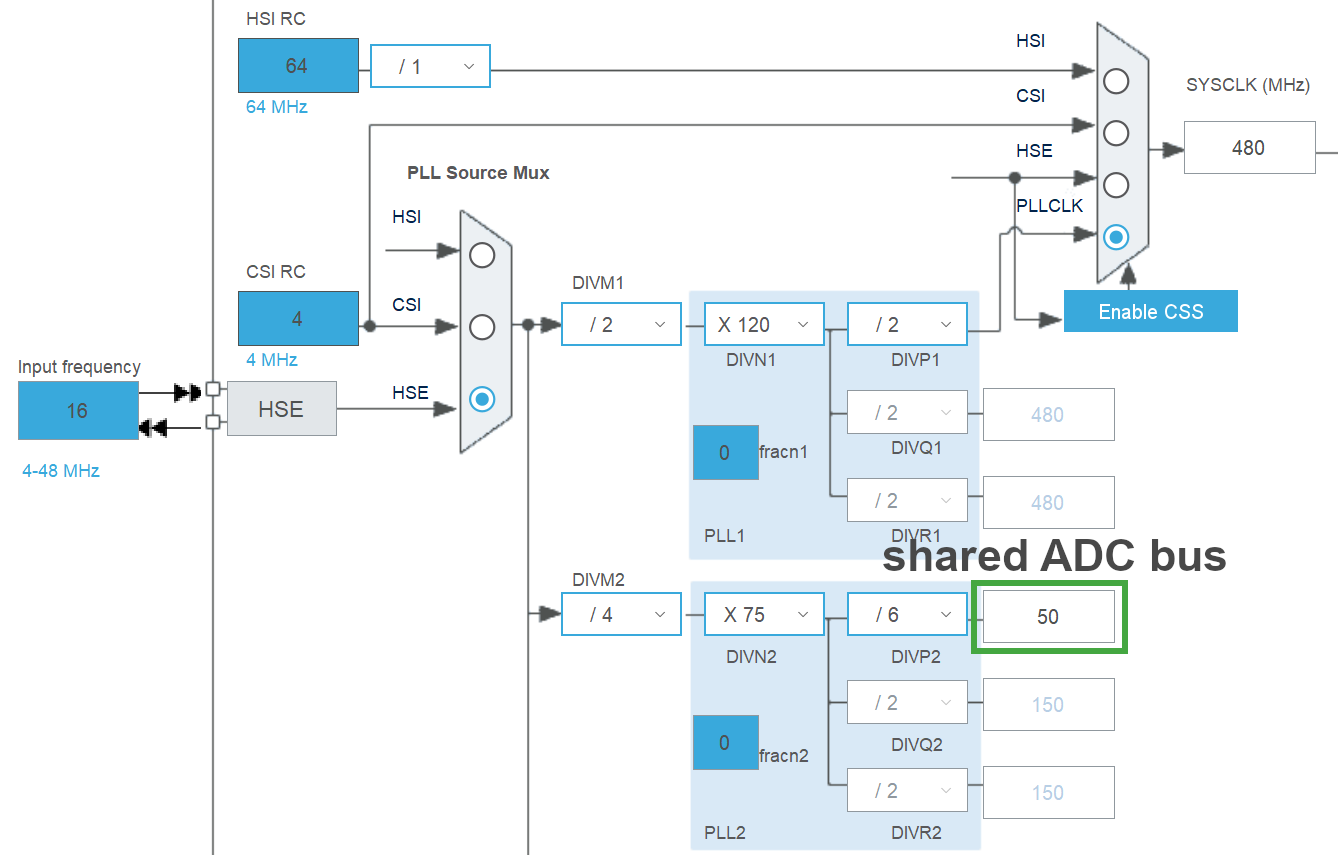
To configure the ADC clock, it is first necessary to configure the PLL (Phase-Locked Loop). The PLL contains frequency multipliers and dividers that enable the generation of different frequencies, which are multiples of the input frequency.
The source frequency for the PLL is the HSE (High Speed External Oscillator), which has a frequency of 16MHz.
The clock is first divided by DIVM2, which is set to 4, resulting in a 4MHz PLL2 input frequency (\(\text{ref2_ck}\)). Additionally, the PLL2RGE field in the PLLCFGR register must be configured according to the selected range for \(\text{ref2_ck}\). Since we use 4MHz, it is set to the 4:8MHz range.
The clock is then multiplied by DIVN2, which is set to 75, resulting in a VCO (Voltage-Controlled Oscillator) frequency of 300MHz. The frequency was selected to fit within the chosen VCO range in the PLL2VCOSEL field of the PLLCFGR register, which is set to the narrow range of 150:420MHz.
Finally, the VCO frequency is divided by DIVP2, which is set to 6, resulting in a 50MHz frequency for the shared ADC bus.
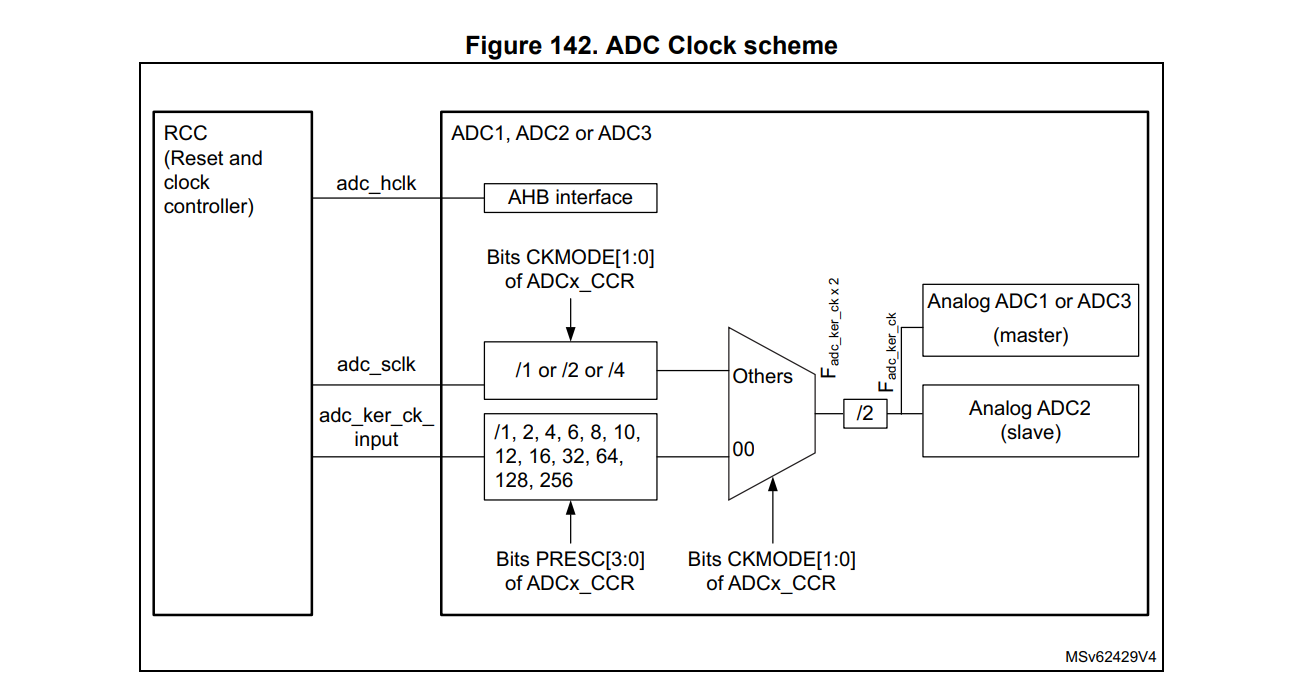
The ADC clock is selected to be independent and asynchronous with the AHB clock, named \(\text{adc_ker_ck_input}\) and derived from PLL2. The clock then passes through a settable prescaler CKMODE in the ADCx_CCR register, which is set to 1 (no clock division). Then, it passes through a fixed /2 prescaler, resulting in a 25MHz frequency (\(F_{\text{adc_ker_ck}}\)) for each individual ADC. This frequency must comply with the maximum ADC clock frequency specified in Table 99 of the STM32H747 Datasheet.
Cache Coherence
When using the ADC with DMA, you must account for data cache (D‑Cache) coherence. The DMA controller writes samples directly to memory, bypassing the CPU and therefore not updating the cache. If CPU then reads the buffer from cache, it may read outdated samples stored in cache instead of the actual data in memory, as it is not aware of DMA transfers.
To ensure the CPU reads fresh data, invalidate the D-Cache lines that cover the DMA destination buffer. Use the CMSIS function SCB_InvalidateDCache_by_Addr(mem_addr, mem_size), where:
mem_addr: the start address of the ADC buffer (aligned to a cache-line boundary)mem_size: the length in bytes
Invalidation operates on whole cache lines. If the buffer is not aligned or its size is not a multiple of the cache-line size, invalidation may affect cache lines that also contain unrelated variables, which can degrade performance.
To avoid that, align the ADC buffer to the cache-line size and choose a buffer length that is a cache-line multiple. On STM32H747, the D-Cache line size is 32 bytes and is available as the macro __SCB_DCACHE_LINE_SIZE. For a uint16_t buffer, the element count should be a multiple of 16. A properly aligned manual declaration looks like this:
const uint16_t memory4adc_size = 128; // multiple of __SCB_DCACHE_LINE_SIZE/sizeof(uint16_t)
__attribute__((aligned(__SCB_DCACHE_LINE_SIZE))) uint16_t memory4adc[memory4adc_size];
The SensEdu library automates both proper buffer declaration and cache invalidation. Use the following procedure:
- Declare the buffer with
SENSEDU_ADC_BUFFER(name, user_size)where:name: the variable name to access the buffer later in codeuser_size: the number of requireduint16_telements
- Start the ADC with
SensEdu_ADC_Start(ADC_TypeDef* ADC)after initialization
The library:
- Ensures the buffer is aligned to
__SCB_DCACHE_LINE_SIZE - Rounds the actual allocation as needed to satisfy cache-line requirements
- Performs the required cache invalidation automatically inside
SensEdu_ADC_Start(ADC_TypeDef* ADC)before starting DMA transfers
const uint16_t buf_size = 50;
uint8_t pins[1] = {A0};
SENSEDU_ADC_BUFFER(buf, buf_size);
SensEdu_ADC_Settings adc_settings = {
    .adc = ADC1,
    .pins = pins,
    .pin_num = 1,
    .conv_mode = SENSEDU_ADC_MODE_CONT,
    .sampling_freq = 0,
    .dma_mode = SENSEDU_ADC_DMA_CONNECT,
    .mem_address = (uint16_t*)buf,
    .mem_size = buf_size
};

void setup() {
    SensEdu_ADC_Init(&adc_settings);
    SensEdu_ADC_Enable(ADC1);
    SensEdu_ADC_Start(ADC1);
}

void loop() {
    if (SensEdu_ADC_GetTransferStatus(ADC1)) {
        Serial.println("------");
        for (uint16_t i = 0; i < buf_size; i++) {
            Serial.println(buf[i]);
        }
        SensEdu_ADC_ClearTransferStatus(ADC1);
        SensEdu_ADC_Start(ADC1);
    }
}
The SENSEDU_ADC_BUFFER macro accepts any user-defined size in uint16_t elements. The library allocates a slightly larger buffer internally to meet cache‑line requirements. Continue to use the requested element count (user_size) ignoring the internally padded capacity.
Some legacy projects manually declare DMA buffers using the __attribute__((aligned(...))). While this can work, it is easy to get alignment or sizing wrong, which can lead to unnecessary cache invalidation or other unexpected behavior. Whenever you use the ADC in DMA mode, prefer SENSEDU_ADC_BUFFER.